
Prep
Kitchen work starts in a timer-driven preparing lane.
Tickets show order age, item quantities, notes, source labels, and overdue state so cooks can prioritize the line.
Ticket timer
Overdue cues
Source labels
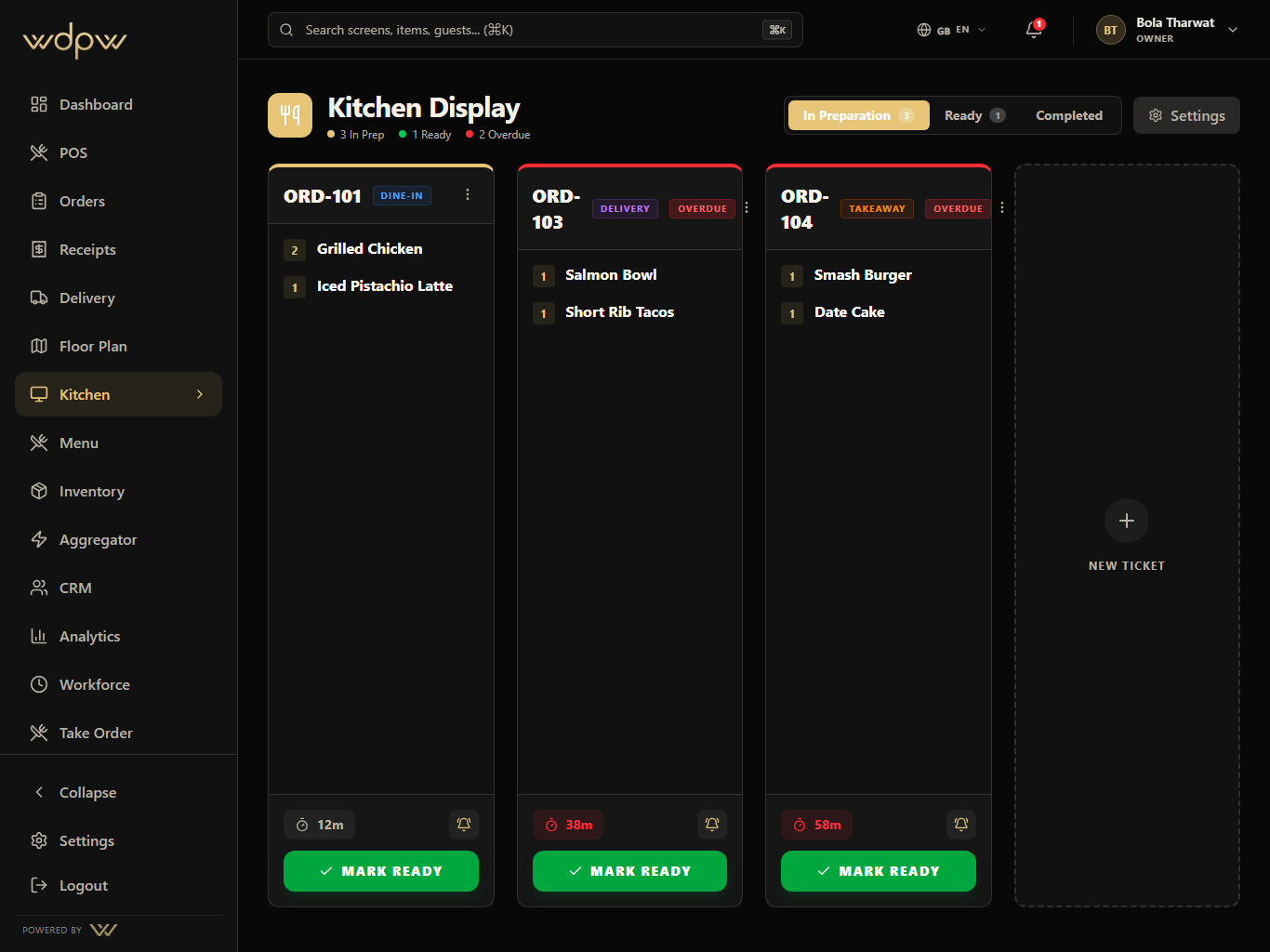
A production screen for preparing, ready, and completed orders with timers, station focus, source labels, and ready-for-pickup handoff.
Timers
on every ticket
Ready
pickup lane
Station
routing
KDS turns incoming orders into visible production cards so the kitchen can see age, channel, items, guest notes, and ready actions.
Timers
on every ticket
Ready
pickup lane
Station
routing
Receive ticket
Prepare by station
Mark ready
Notify pickup
Complete service
These are the smaller features hiding inside KDS: the controls buyers ask about after they understand the headline module.
Prep
Tickets show order age, item quantities, notes, source labels, and overdue state so cooks can prioritize the line.
Ticket timer
Overdue cues
Source labels
Each KDS module pairs the primary screen with deeper app states, captured in iPad landscape with the WDPW site palette applied.
Preparing, ready, and completed lanes
Ticket age, overdue state, and priority cues
Dine-in, delivery, QR, and POS order labels
Manual ticket support for walk-in kitchen requests
Ready notifications and pickup handoff
Persistent local state for bumped and completed cards
Unify dine-in, takeaway, QR, waiter, web, and delivery orders into one operational history with status filters and handoff controls.
View moduleA touch-first POS for menu browsing, modifiers, discounts, open checks, table handoff, payment, refunds, and cashier closeout.
View moduleDelivery marketplace mapping, availability sync, webhook inbox, outbound status push, and global delivery controls in one operations hub — built and ready as platform integrations roll out (Talabat first).
View moduleOperational reporting across sales, labor, item mix, delivery channels, stock risk, cashier closeout, tax, and branch performance.
View moduleThe KDS replaces paper kitchen tickets with digital prep lanes — preparing, ready, completed — showing each ticket's age, priority, and order channel.
Marking a ticket ready bumps it and notifies the cashier or waiter, so hand-off is coordinated without shouting across the pass.
Yes. The KDS supports station routing so the right items appear on the right screen, and it accepts manual tickets for walk-in kitchen requests.
Yes. Like the POS, the KDS keeps working during an internet or power outage and syncs when connectivity returns; bumped tickets persist across reloads.