

Cashier workflow

Point of Sale

A touch-first POS for menu browsing, modifiers, discounts, open checks, table handoff, payment, refunds, and cashier closeout.

4

service modes

Offline

order queue

Fast

menu search

Cashier workflowiPad landscape
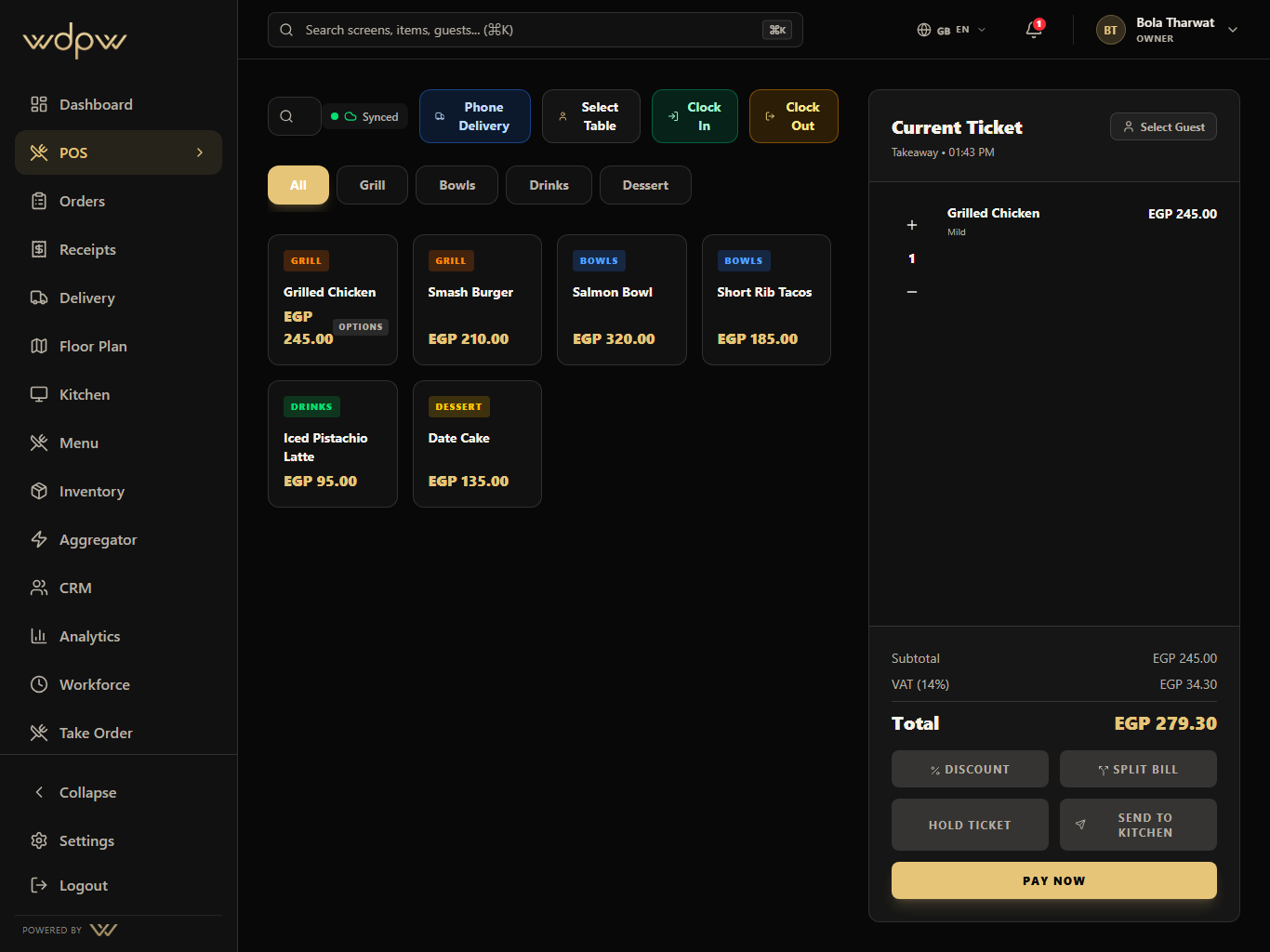
Point of Sale WDPW app screen
4 service modesOffline order queueFast menu search
Why it matters

Show the workflow, then prove the operator outcome.

The cashier screen keeps menu, order source, table selection, ticket totals, discounts, split bill, and kitchen send in one tablet-first workspace.

4

service modes

Offline

order queue

Fast

menu search

Flow

A route from staff action to management signal.

1

Choose channel

2

Build the ticket

3

Send to kitchen

4

Collect payment

5

Close the shift

Inside the module

Each tab has a job in the actual restaurant workflow.

These are the smaller features hiding inside POS: the controls buyers ask about after they understand the headline module.

Modes

Service mode is the first decision, not an afterthought.

Cashiers can move between dine-in, takeaway, phone delivery, QR pickup, web orders, and table-loaded checks without changing systems.

Phone delivery modal

Select table handoff

Web pickup-code lookup
Point of Sale Modes workflow
Screen tour

A wider look at the workflow, from main screen to edge state.

Each POS module pairs the primary screen with deeper app states, captured in iPad landscape with the WDPW site palette applied.

Point of Sale Live cashier ticket screen
Capabilities

Built around the real screen your staff will use.

Point of Sale detailed screen

Dine-in, takeaway, delivery, and QR handoff

Discount, refund, split bill, and hold ticket actions

Product search, category filters, modifiers, and notes

Offline queue with sync-ready order capture

Customer selection for loyalty and CRM context

Receipt, tax, and cashier closeout readiness

Connected modules

Every subpage points to the rest of the operating system.

Order Management

Unify dine-in, takeaway, QR, waiter, web, and delivery orders into one operational history with status filters and handoff controls.

View module

Floor Plan

A live table map for occupancy, reservations, active checks, QR codes, waiter handoff, and dining room control.

View module

Kitchen Display System

A production screen for preparing, ready, and completed orders with timers, station focus, source labels, and ready-for-pickup handoff.

View module

CRM and Loyalty

Guest profiles, loyalty points, member tiers, visit history, rewards, and customer context connected to real restaurant orders.

View module
FAQ

Point of Sale — questions & answers

What is WDPW's restaurant POS?

WDPW's POS is a touch-first, cloud point of sale with four service modes — dine-in, takeaway, delivery, and QR pickup. It runs on any iPad, Android tablet, or web browser and keeps working offline.

Does the POS work offline?

Yes. Orders are captured locally in an offline queue during an internet or power outage and sync automatically when connectivity returns, so cashiers keep taking orders through a rough connection.

What payment methods does the POS support?

At the counter: cash, card, Apple Pay, gift card, and STC Pay. On QR orders, guests can pay by card or wallet online via Paymob. Split bills and discounts are supported on every check.

Do I need special hardware to run the POS?

No. The POS runs on iPads, Android tablets, or browsers you already own, with no per-cashier license fees. You can run unlimited POS devices on every plan.

Can cashiers attach loyalty and take payments in one flow?

Yes. A cashier can attach a customer to a check, award or redeem loyalty points on payment, apply discounts, split the bill, hold a ticket, and send items to the kitchen — all from the same screen.

How does the POS reach the kitchen?

Sending a ticket fires it straight to the Kitchen Display System with modifiers and notes, where the kitchen times, prioritizes, and bumps it — no paper tickets.

Does the POS issue ETA-compliant receipts?

Yes. WDPW issues ETA-ready electronic receipts automatically when an order is paid, and records the immutable Z-report for end-of-day tax compliance in Egypt.

Next step

Give buyers a real product path, then let sales tailor the rollout.

Book a demo